Designing trust into AI-powered workflows
The AI matches thousands of products in seconds. The hard part is getting Ops to trust the answers - and to override the wrong ones without breaking a sweat.
What is Matching?
Matching is how we link a customer's catalog product to the same product sold by other retailers. It's the foundation of Wiser's app - every price insight depends on these links being correct.
Retailer data is messy (inconsistent titles, attributes, identifiers), so matches can be inaccurate or incomplete. And match quality is critical: it's the #1 reason customers churn.
Our internal team struggled with ineffective workflows (and 90s UI)
Ops had to jump between different portals (and different legacy logic) to manage matching across products. The workflow was fragmented, inconsistent, and slowed them down.
Their job: ensure matches are accurate and complete for customers. That means setting matching rules, reviewing results, spotting issues, and fixing them.
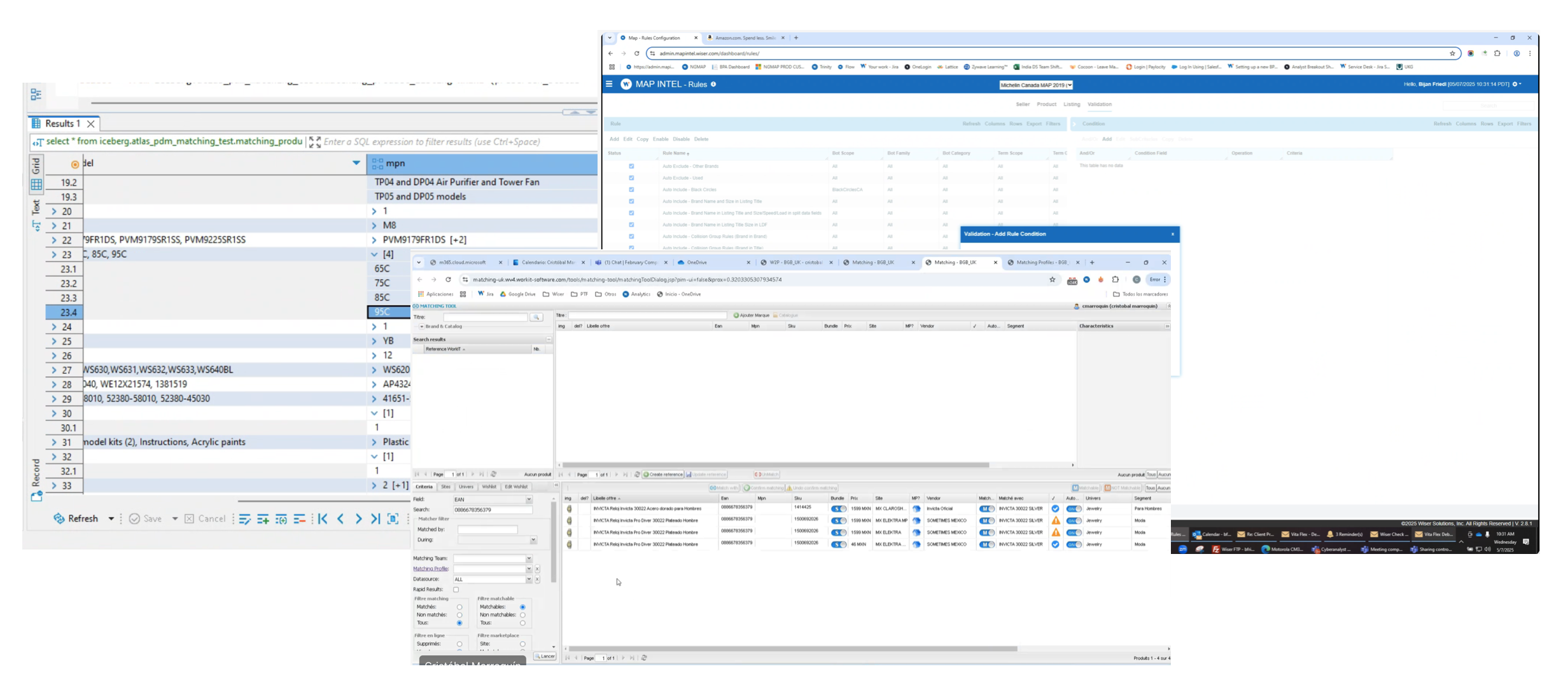
The legacy system Ops were working with
What Ops actually needed
Before designing anything, I ran research sessions with the Ops team - shadowing their workflow and asking them to walk through real tasks. Three questions kept surfacing. Not about features - about the work itself.
The underlying problem wasn't the legacy UI. It was lack of control and visibility - Ops couldn't trust that their actions were having the effect they intended, so every decision felt fragile.
Where to use AI (and where not to)?
The goal wasn't to "AI everything." I mapped the end-to-end Ops workflow and helped decide what AI should do and where humans must stay in the loop.
Why not automate more? Bad matches flow directly to customers and erode trust. The cost of an AI error is too high to remove human oversight from review and correction - at least at this stage.
What the design had to solve
An AI-powered matching tool that's smooth and trustworthy
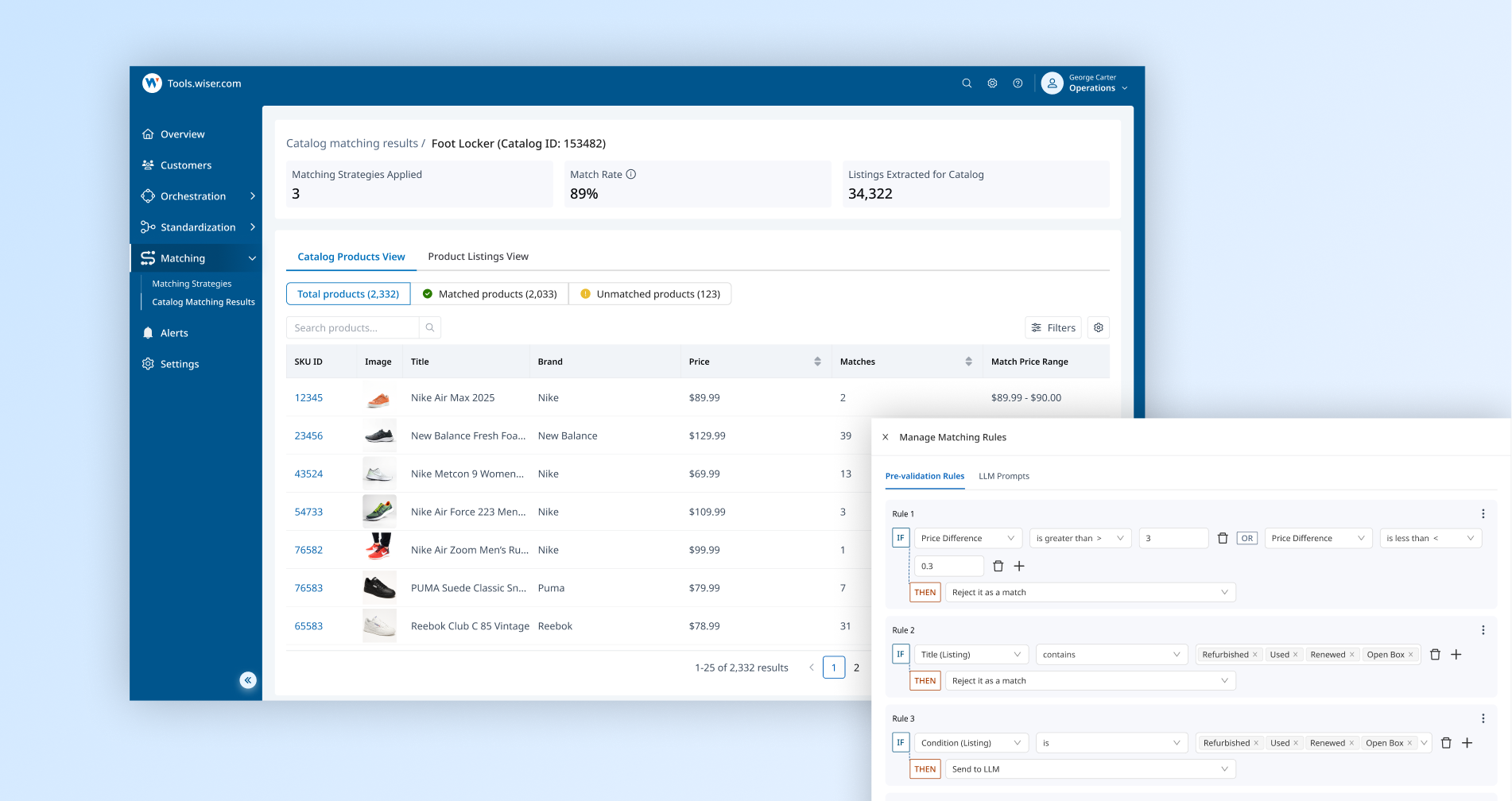
Manage AI-powered rules and control what goes to LLM
Users set rules to send uncertain cases to LLM validation - separating confirmed matches from cases needing review. The system generates a similarity score based on vector embedding attributes, with configurable thresholds.

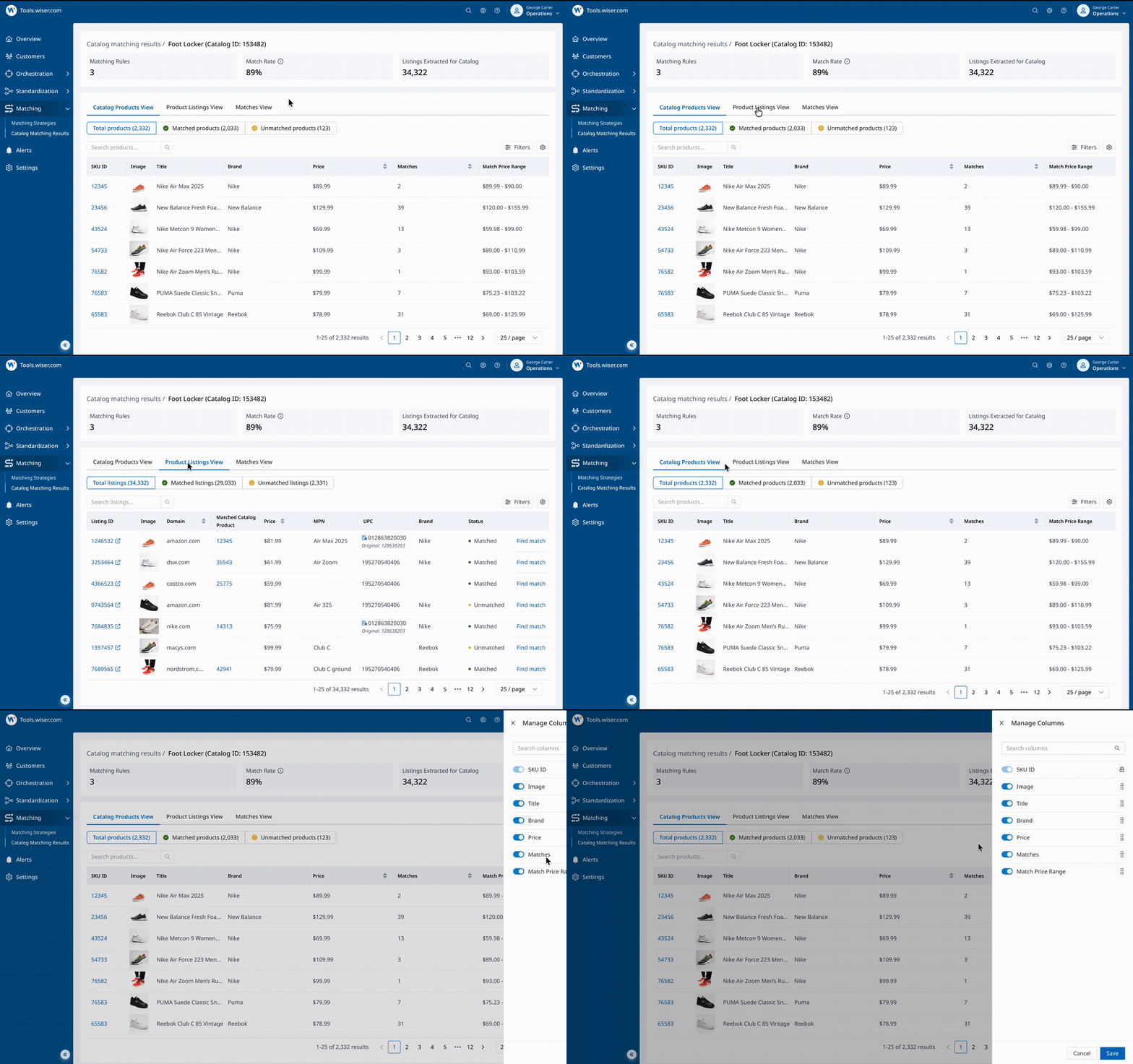
Slice and view results in multiple ways
Review matching results at scale - switch between views, scan key signals, and customize columns to support different review workflows and use cases.
Identify issues faster with filters and signals
Use robust filters and key signals - match count, price delta, suspicious patterns - to surface potential issues quickly without manual scanning.

Take action in context
Find listings to add as matches, remove incorrect matches in a click, and jump to the exact view you need - without losing your place.
.gif)
Happier Ops team, better data, stronger retention
How we got there
How decisions laddered up - and where they got hard
Three challenges drove four features. Not every mapping was 1-to-1 - and a few decisions needed multiple iterations to get right. Here's the ladder, then the two trade-offs that took the most thinking.
Two of the three challenges have a deep-dive trade-off below - Challenge 01 (the AI control dial) and Challenge 03 (how to display confidence). Each one had multiple options on the table; the trade-offs walk through the rejected one alongside the chosen one, and why.
Ops needs to influence what the AI does. The question was how to expose that control without requiring ML literacy.
Threshold sliders give precise control - to ML-fluent users. Most Ops are product experts, not ML engineers. The IF-THEN builder respects that: same dial, with a knob users already know how to turn. AI does the math; Ops make the call.
All matches went through LLM validation carry an AI confidence score. The question was how to show it. A raw percentage looks precise - but precise and useful are not the same thing.
A score is a tool for machines. A calibrated tier is a tool for humans. "Needs review" tells Ops what to do. "61%" tells them nothing unless they already know what 61% means for this product type - and Ops shouldn't have to learn that. Two tiers replace false precision with honest, actionable clarity - and the percentage is still there for users who want it.
Ops need to search and filter listings fast to find potential missing matches and keep customer data complete. The question was how much to show at once.
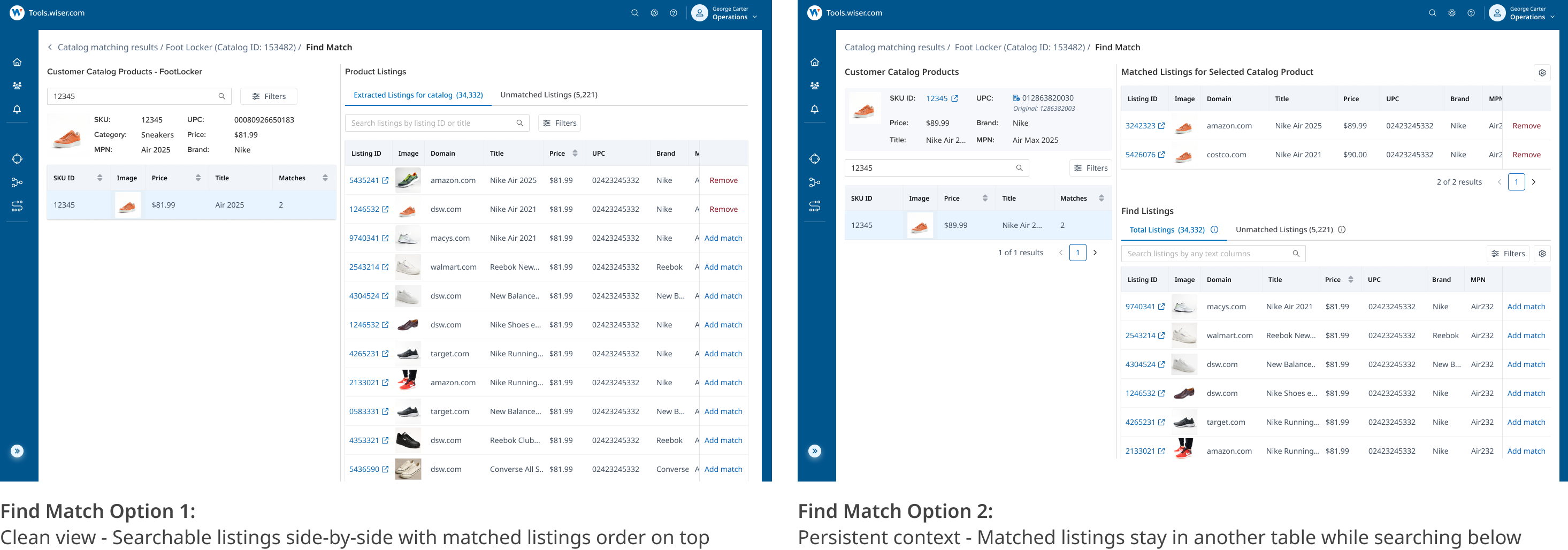
Went with Option B - it adds cognitive load, but it's productive cognitive load. Ops use matched listings as reference points to spot similarities and find likely matches faster.
Vibe coding to speed things up
We needed to shut down legacy systems ASAP - so the validation timeline was tight (5–6 weeks). I used UX Pilot, V0, Figma Make, and Claude Code to explore and iterate faster. As a 0→1 product, I validated high-level flow and IA with users first, before polishing details.
Facilitate tech discovery and keep everyone aligned
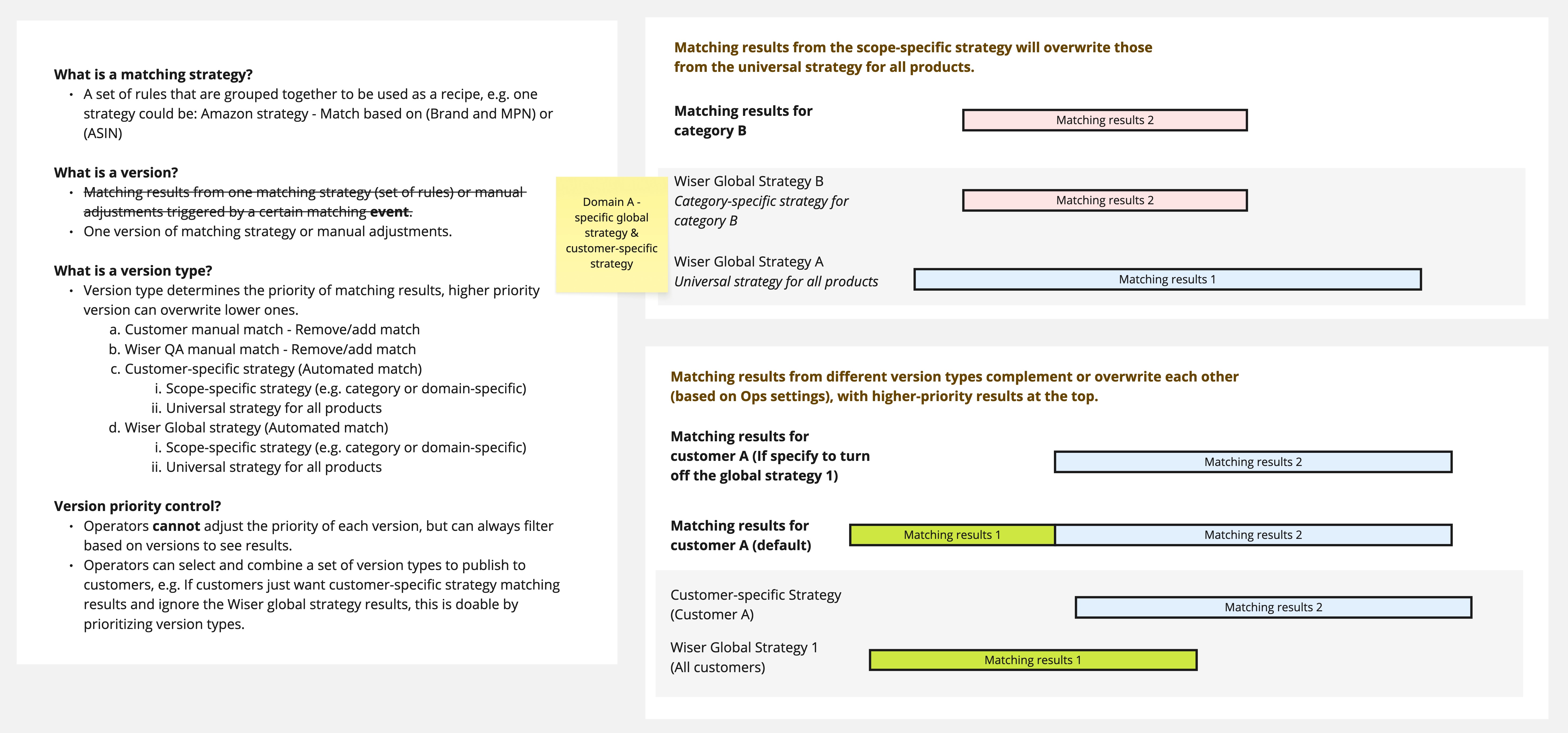
Matching has sophisticated logic - hard to keep everyone aligned without shared language. I drove discovery sessions, created workflow diagrams, and established ubiquitous language so the team could decide without confusion.
Keep aligned, keep moving
Building a new AI-powered matching system meant new logic, a complex workflow, and high stakes for data quality. To move fast, it's critical to get the team aligned through ubiquitous language, workflow diagrams, and frequent checkpoints - so everyone makes decisions from the same version of the truth.
"Design trust into AI-powered workflows"
We launched the platform. Users launched questions: "wait…why?" - How do we make AI results clear, testable, and trustworthy?
What is AI doing?
AI is used in two steps: Vector matching and LLM validation. We embed selected attributes to generate a similarity score; if a case is still uncertain, users can set pre-validation rules to route it to the LLM (a prompt) for a final yes/no.
Internal teams hesitate to adopt the AI-powered workflow
The new platform launched, but adoption is slowing because Ops doesn't feel confident using it. During UAT, the same questions kept surfacing: how the system works, why it produced a result, and whether the data is reliable - making the workflow feel risky to rely on for real decisions.
The core problem isn't "training." It's trust.
What's blocking adoption?
Through task-based UAT and debriefs with Ops, I treated feedback as a trust audit: I logged recurring "how/why" questions, observed hesitation points, and clustered patterns into themes. 3 trust blockers emerged:
4 patterns to make AI trustworthy
Explain reasoning with Match Lineage
For every match result, surface the full reasoning chain - token/vector signals, the rules applied, and (when used) the LLM's one-sentence rationale with a confidence score. Everything is auditable.
.png)
Show and filter by data source
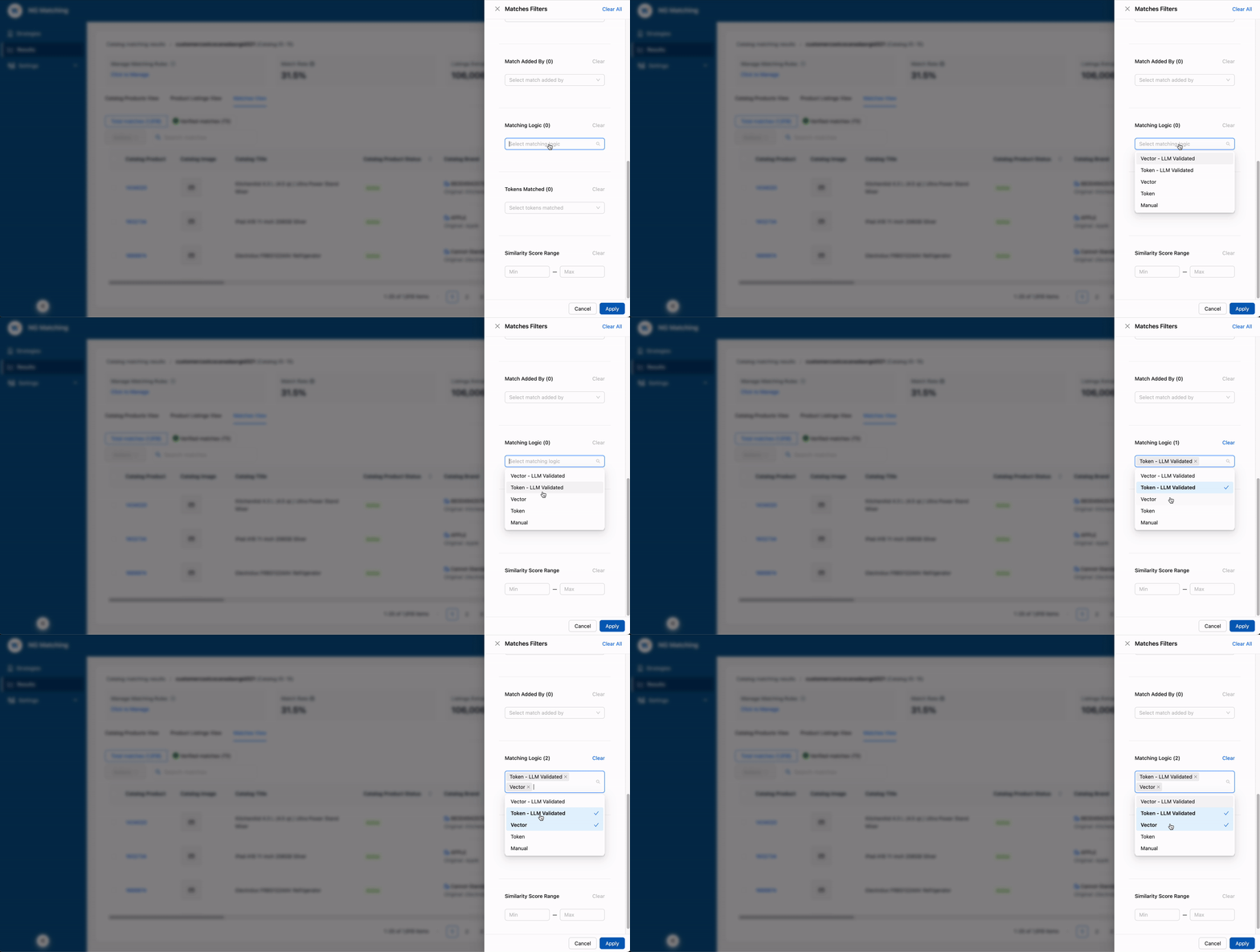
Users needed to understand where each match came from - when it was added and which pipeline produced it (token, vector, or LLM validation). Source-aware labels and filters let them isolate results, compare pipeline performance, and troubleshoot with confidence.
Give users a sandbox (in a system that isn't one)
Match edits are high-stakes: each accept/reject/override updates the catalog customers see, triggers LLM revalidation cost, and writes a permanent audit row. A draft mode flow lets Ops review and edit dozens of matches without every save going live - publish the batch once it's ready, with aggregated impact you can actually evaluate.

Make cost impact visible before running
Users hesitate to reprocess or update rules because they can't predict the cost impact - "Am I about to spend $5K?" anxiety. I surfaced estimated volume and LLM cost before users commit to a run, turning anxiety into informed confidence.
.png)
How I got to "draft mode"
Two ways to keep match edits safe. The interesting question wasn't whether to add friction - it was where to put it.
Customers will see this immediately.
Save + confirm per match felt fast - and that was the problem. Every match decision is high-stakes (catalog correctness, customer-facing data, audit trail), but a modal after every save trains users to click through without reading. Draft mode flips it: edits are cheap, only publishing is high-stakes - and it happens once for the whole batch, with aggregated impact you can actually understand. Friction belongs on the irreversible step, not the review step.
Less friction, fewer incidents, faster reviews
Trust is a continuous job
Trust didn't end at launch - it needs ongoing visibility and control. Next, I'd focus on:
Trust is the product
AI isn't powerful just because it's "AI" - it shouldn't be a buzzword taped onto a workflow. What makes it actually useful is when users understand it, trust it, and feel safe acting on it. Designing for trust means building in explainability, predictability, and control from the start - not as an afterthought after adoption stalls.